

Multi-Session Browsers
DemoStory Browser
A C++ multi-session browser where different user accounts share one window, with a payment system and admin dashboard.
- C++
- Chromium
- Multi-session
- Payments
- Admin dashboard
What was built
DemoStory is a multi-session browser written in C++ that lets several user accounts work side by side in the same window, each logged into its own session at the same time. Building that meant writing the multi-session core directly in C++ rather than layering it on top of the browser, so tabs could hold genuinely separate logins instead of sharing one profile. Around the browser itself, we also built a full payment system and an admin dashboard, so the product could be sold and managed as a hosted service rather than distributed as a plain download.
The engineering challenge
Running several logged-in accounts in one browser window means the browser has to keep each session’s cookies, storage and state apart even though the window and its features are shared. That is a different engineering problem from an ordinary tabbed browser, where every tab uses the same profile by default, and it is what the payment system and admin dashboard sit on top of.
Screenshots
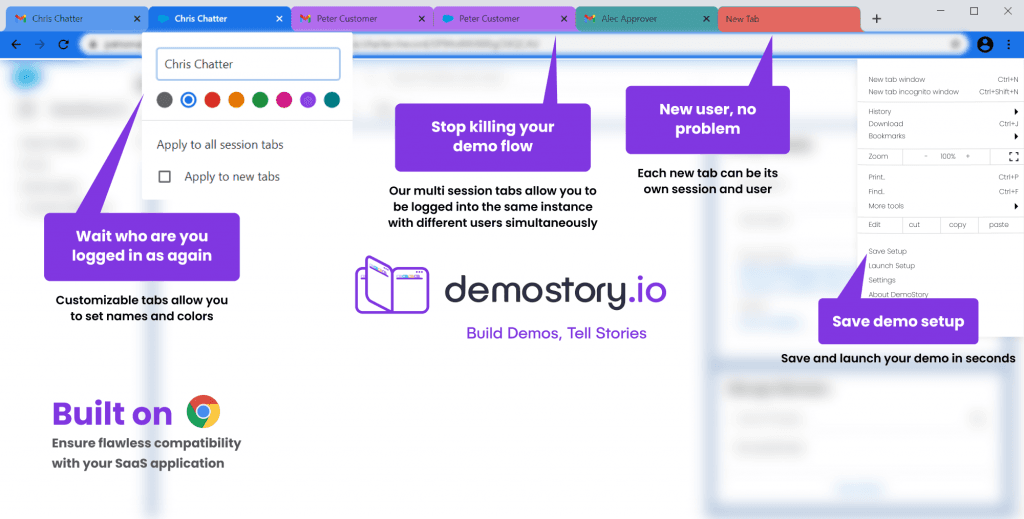
Demostory’s multi-session tabs, each logged in as a different user. Image: demostory.io (archived).
Engineering scope and what shipped
- Multi-session browser core in C++
- Different user accounts running in the same browser window
- A full payment system
- An admin dashboard
About the product
Demostory is described as “the browser for live demos”. It is built on Chromium, and each new tab can be its own session, so a presenter can be logged into the same product as several different users in one browser window.
A demo setup, including tab names, colors, order and logins, can be saved as a shortcut and reopened in one click. It runs on Windows and macOS. Its original website is no longer online, so these details come from an archived copy.
Source: demostory.io (Internet Archive, 2024). Checked September 2026; product details may have changed since.
Related services
Facing a similar engineering problem?
Tell us what you are building. A browser engineer will walk you through how we would approach it, what is hard about it and what it takes to maintain.